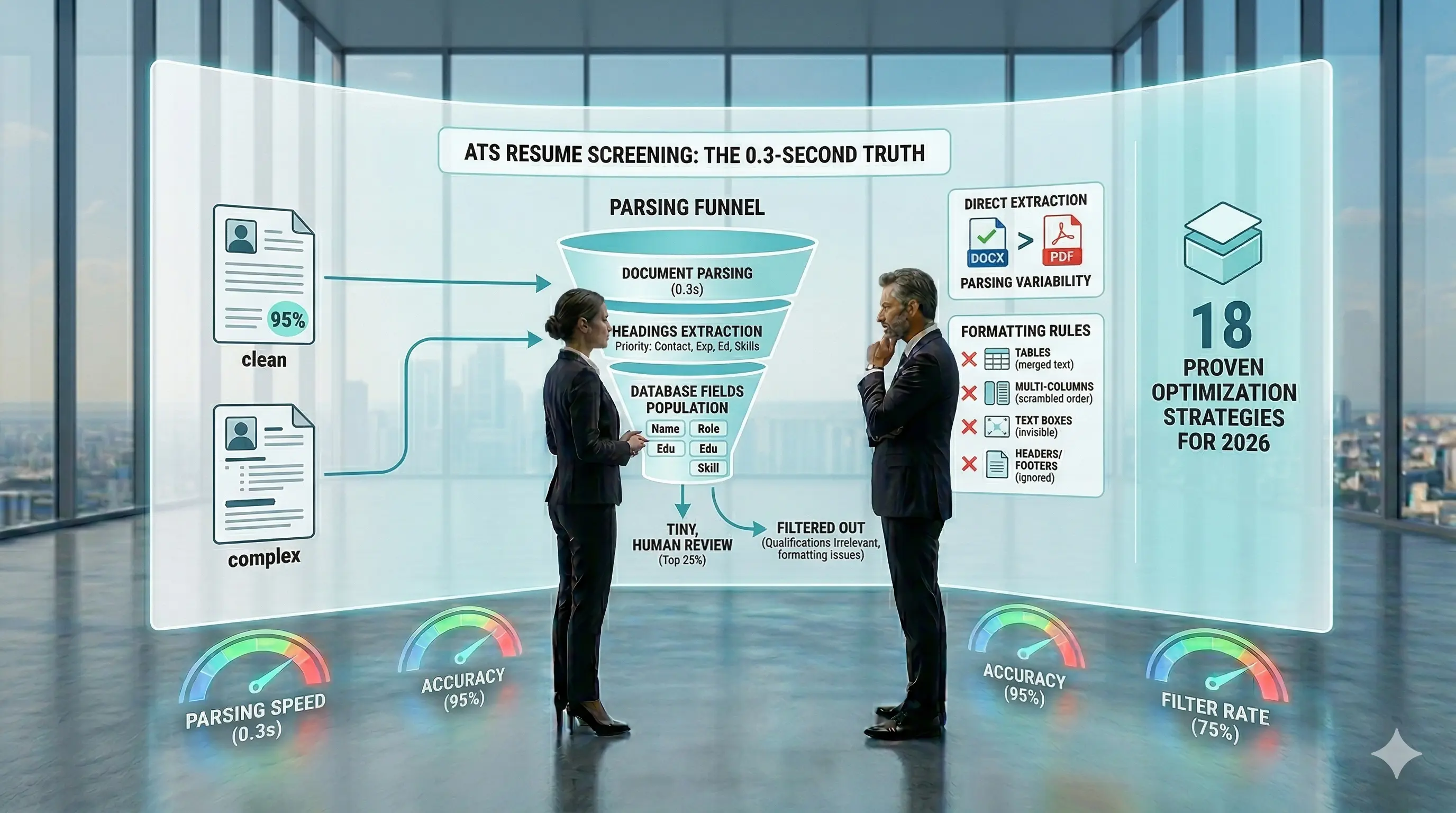
18 Automated Resume Screening Tips That Actually Get You Past ATS in 2026
Key Takeaways (TL;DR)
- ATS systems filter out 75% of resumes before human review. These technical optimizations ensure your qualifications actually reach recruiters.
- Use single-column layouts and standard fonts - Multi-column resumes have 43% higher parsing error rates; stick to Arial, Calibri, or Times New Roman to prevent character misreading
- Mirror job description keywords exactly - Extract 10-15 primary keywords from job postings and use identical phrases like "RESTful APIs" rather than variations like "REST APIs"
- Remove all graphics and visual elements - Photos, charts, and icons remain invisible to ATS systems, creating gaps in your extracted data that hurt your ranking
- Submit in DOCX format by default - DOCX files achieve 90-95% parsing reliability compared to PDFs which vary between 50-95% depending on creation method
- Tailor every application with quantified achievements - Customized resumes generate 6x more interviews; pair action verbs with specific metrics using the Action + Tool + Result formula
- These changes determine whether your resume gets filtered out in under 0.3 seconds or advances to human review.
Automated resume screening filters out 75% of resumes before any human reviews them [17] [16] [16]. With the average job posting receiving 250+ applications [16], companies rely on ATS systems to manage volume. Understanding how automated resume screening works is no longer optional—it's the difference between getting interviews and getting ignored.
If your resume fails ATS optimization, your qualifications become irrelevant. This guide provides 18 proven strategies to beat automated resume screening and land interviews in 2026.
Understand How Automated Resume Screening Works

Image Source: Geekflare
Automated resume screening software processes your application in three distinct stages. Each stage determines whether your qualifications reach human review or get filtered out automatically.
Document Parsing Process
The system converts your resume into machine-readable text within 0.3 seconds. DOCX files allow direct extraction from their XML structure. PDFs require additional parsing that varies wildly in accuracy. Clean documents achieve 95% parsing accuracy [16].
The parser searches for specific sections in priority order. Contact information comes first, followed by section headers, employment history, education, skills, and certifications. The system relies on recognizable headings like "Work Experience," "Education," and "Skills" to categorize information into database fields.
Complex formatting destroys this process. Tables merge text incorrectly across cells. Multi-column layouts scramble reading order completely. Headers and footers get ignored. Text boxes and images remain invisible to the parser.
Keyword Matching Algorithms
Once parsed, the system compares your resume against job description terms. Basic systems use exact string matching. Advanced platforms employ semantic matching through natural language processing, recognizing that "data visualization" connects to "Tableau" [18].
Keyword matching accounts for 40-50% of your total ranking [18]. Required hard skills receive 10-15 points each. Preferred skills earn 5-8 points. Soft skills get 3-5 points [18].
Scoring and Ranking System
The system assigns weighted scores based on qualification alignment with job criteria. Most platforms apply minimum thresholds: 70% advances to shortlist consideration, 80% indicates strong alignment. Candidates scoring below 60% get filtered automatically [18].
Missing required skills, vague language, or formatting errors that prevent data extraction cause immediate rejection.
Use a Single-Column Layout

Image Source: Resume.io
Single-column formatting determines whether automated resume screening software can extract your qualifications accurately. This layout choice directly impacts your ability to pass initial screening.
What This Means
A single-column layout presents all content in one linear sequence from top to bottom. Your contact details, professional summary, work experience, skills, and education flow vertically down the page.
Automated resume screening systems read documents exactly as you would read a book. They extract text from left to right, top to bottom, processing one line at a time. When content splits into multiple vertical sections, the system cannot reliably determine which column should be processed first.
Why Multi-Column Layouts Fail
Two-column resumes experience 43% higher critical parsing error rates compared to single-column formats [17]. When automated resume screening software encounters divided layouts, it reads table cells sequentially, causing content from unrelated sections to merge.
A skills list in the left column interleaves with job titles from the right column, producing incoherent extracted data. Specifically, 21% of two-column resumes had work experience entries with incorrectly extracted job titles or company names [17]. More severely, 67% of skills sidebar content was either merged with adjacent sections or dropped entirely by major platforms [17].
A resume that displays your React expertise alongside a product manager role may result in a database entry reading "React Senior Engineer" because the parser merged your skills column with your experience column. These parsing failures mean your resume never reaches human review, regardless of your qualifications.
Implementation Guidelines
Keep your main body content strictly single-column. You may use two columns only in the header area for contact details positioned side by side.
Everything below your contact information should flow vertically in one column. This approach ensures automated resume screening systems can parse your qualifications without merging unrelated sections or dropping critical information entirely.
Choose Standard ATS-Friendly Fonts
Font choice determines whether ATS systems can read your resume accurately. Decorative fonts cause character recognition errors that turn your experience into unreadable text.
Fonts That Work
Arial offers universal compatibility across all ATS platforms [16]. Calibri balances modern appearance with reliable parsing, making it the safest Microsoft default [19]. Times New Roman works perfectly with every system, though it appears dated on digital screens [20].
Georgia provides clean serif readability for traditional industries [19]. Verdana uses wider spacing that prevents character misreading during parsing [19]. Helvetica delivers professional appearance, especially effective in PDF submissions [21].
For law or academic positions, Garamond maintains elegance while ensuring ATS compatibility [16].
Fonts That Break Parsing
Script fonts like Brush Script create recognition errors through complex character shapes [22]. Custom downloaded fonts cause symbol substitution when the ATS lacks that font installed [16]. Comic Sans and decorative options confuse optical character recognition entirely.
Systems that cannot parse your font choice automatically reject your application before human review.
Size Guidelines
Use 10-12 points for body text, with 11 points optimal for readability [22]. Set section headings at 12-14 points for clear hierarchy [21]. Your name can reach 14-18 points without creating parsing issues [21]. Text below 10 points triggers ATS parsing errors [22].
Submit in the Right File Format

Image Source: Maywise
File format determines parsing success before content even matters. DOCX files achieve 90-95% parsing reliability, while PDF performance varies wildly between 50-95% depending on creation method [7].
DOCX vs PDF: The Technical Reality
DOCX files store content as structured XML data. This gives ATS systems clear signals about headings, paragraphs, and list items [7]. The predictable structure allows parsers to extract information reliably across virtually all platforms. Visual inconsistency across Word versions exists, but ATS software ignores appearance and focuses solely on data extraction [7].
PDF files preserve visual layout perfectly but store text as positioned characters rather than structured content [7]. Text-based PDFs exported from Microsoft Word or Google Docs parse reasonably well. PDFs created from design tools like Canva, Adobe InDesign, or Figma embed text as vector graphics, making extraction unreliable [7]. Scanned PDFs contain no text layer at all. While some systems use OCR to extract text, OCR accuracy reaches only 70-85% [7].
When Each Format Works
Submit DOCX as your default for job portals and ATS uploads [8]. Use PDF only when the job posting specifically requests it, when emailing recruiters directly, or for networking events where visual presentation matters [7]. Test any PDF by attempting to select and copy text. If you cannot select individual words, the ATS cannot read it either [7].
What Never Works
Never submit .pages files, InDesign documents, Google Docs links, or ZIP files [9]. Avoid image-based PDFs created through scanning or "Print to PDF" functions [7]. These formats guarantee parsing failure regardless of content quality.
Use Standard Section Headers

Image Source: Resume Worded
Section header labels determine whether ATS systems can categorize your information correctly. When the parser fails to recognize a section, your content gets misfiled or ignored entirely.
Required Section Names
Use these exact labels for core sections: Work Experience or Professional Experience for employment history, Education for academic credentials, Skills or Technical Skills for capabilities, Professional Summary or Summary for your opening statement, and Certifications for licenses and credentials [10]. These terms appear in every ATS system's pattern matching templates.
What ATS Systems Recognize
ATS platforms scan for standard headings like "Work Experience," "Education," and "Skills" to parse content into database fields [11]. The system uses these labels to index your qualifications for keyword searches. Employment History, Academic Background, Core Competencies, and Career Summary represent acceptable variations that most platforms recognize [10] [2].
Headers That Break Parsing
Creative section titles destroy parsing completely. Avoid "My Journey," "Where I've Worked," "What I Bring," "Career Highlights," or any narrative phrasing [10][232]. One product manager who used "Professional Journey" and "Core Strengths" instead of standard headers experienced 60% fewer interview invites because her resume parsed with missing work dates and no skills section [2]. Similarly, decorative dividers made with repeated characters like dashes or equal signs interfere with how ATS systems read section breaks [12].
Standard headers are not creative limitations. They are technical requirements that determine whether your qualifications reach human review.
Mirror Job Description Keywords Exactly

Image Source: Resumly.ai
Keyword selection determines whether your resume passes initial screening or gets rejected instantly. The terms you use must match job posting language exactly.
How to Extract Keywords
Start by collecting 5-10 job descriptions for your target role and identify repeated patterns [13]. Focus on skills mentioned across multiple postings, required qualifications, and industry-specific terminology. Requirements listed first carry the highest scoring weight in ATS systems [14].
Separate required skills (marked as "must have" or "essential") from preferred skills (labeled "nice to have" or "bonus") [14]. Hard skills like named tools (Salesforce, Jira), methodologies (Agile, Six Sigma), and certifications (PMP, CISSP) carry significantly more weight than general terms [14].
Exact Match vs Variations
When job postings specify "RESTful APIs," use that exact phrase rather than "REST APIs" or "API development" [13]. ATS systems prioritize exact string matches [15]. Include both acronyms and full terms: write "CRM (Customer Relationship Management)" to cover different search patterns [13]. Required keywords should appear multiple times across your resume, while preferred keywords need coverage but not repetition [14].
Where to Place Keywords
Distribute your most critical keywords across at least two sections [14]. Place 3-5 core keywords in your professional summary for maximum visibility [13]. Integrate keywords naturally within experience bullets alongside quantified achievements [13]. List all relevant keywords in your skills section, but pair them with contextual usage elsewhere [13].
Remove All Graphics and Visual Elements
Graphics and images create invisible gaps in your ATS results. Photos, logos, icons, charts, and infographics may enhance visual appeal, but they sabotage your chances of passing initial screening.
What ATS Cannot Read
ATS software processes text only. Company logos, headshots, skill bar charts, and infographic-style layouts remain completely invisible to the parser [16]. Text saved as images gets treated as a picture, making the content unreadable [17]. Icons replacing text, such as using a phone symbol instead of typing your number, often go unrecognized [17]. Star ratings or bar charts showing skill proficiency are lost entirely during parsing [16].
Impact on Parsing
The ATS system sees blank space where your designed graphics appear [16]. This creates multiple problems: graphics add file size while contributing zero searchable content [16], they can hide information the scanning system needs without you realizing it [18], and oversized files may fail to upload as attachments [18]. Critical information gets fragmented or lost when visual elements interfere with text extraction [17].
Alternative Approaches
Replace all visual elements with plain text. Instead of a bar chart showing "Python: 4/5 stars," write "Python (Advanced)" as regular text [16]. Convert skill icons to written labels. Replace decorative graphics with well-structured text that emphasizes your achievements [19].
Place Keywords in Meaningful Context
Skills lists alone represent outdated ATS optimization. Modern systems evaluate keywords embedded within achievement-based context far more favorably than isolated skill blocks.
Why Context Beats Lists
A skills section reading "Sales, CRM, Negotiation, Closing" provides keyword matches but zero credibility. The same terms embedded in "Spearheaded a regional sales initiative using CRM analytics to identify leads, utilizing negotiation tactics to close $500k" contain identical keywords with measurable proof [20].
Both approaches satisfy basic keyword requirements. The contextual version scores higher because it demonstrates application rather than claims.
Strong vs Weak Placement
Weak keyword usage creates no value beyond matching: "Skills: Python, SQL, Tableau."
Strong contextual placement builds credibility: "Developed SQL queries to analyze customer behavior, resulting in a 15% increase in retention" [21].
The difference lies in proof. Context shows you applied the skill to achieve specific outcomes.
How ATS Weighs Placement
Professional summaries receive the highest contextual scoring because they process first [22]. Keywords appearing in achievement statements with quantified results rank substantially higher than those in standalone lists [22].
Recent experience sections carry additional weight. Skills mentioned under your two most recent positions score higher in automated resume screening system rankings [22]. This means contextual placement in recent roles provides the strongest signal to ATS algorithms.
Place your most critical keywords in professional summaries, recent experience bullets, and skills sections. The combination of broad coverage plus contextual depth creates the strongest ATS performance.
Include a Dedicated Skills Section

Image Source: Resume.io
A skills section positioned directly after your professional summary creates a critical scanning checkpoint for both ATS systems and recruiters [1]. This placement ensures maximum visibility during the initial 0.3-second parsing window that determines your ranking.
Focus on Hard Skills Only
ATS systems evaluate algorithmic matches, not subjective qualities [1]. Technical platforms like Python, Salesforce, and AWS receive precise scoring. Methodologies such as Agile or Six Sigma map to specific job requirements. Programming languages, certifications, and industry tools provide measurable matching criteria [1] [23].
Soft skills belong in experience descriptions where you can demonstrate them through outcomes. Communication skills mean nothing without context. Leadership claims require evidence. The skills section rewards concrete, verifiable capabilities [1].
Quantity Guidelines
Eight to twelve targeted skills create the optimal balance between coverage and focus [1]. This range satisfies ATS matching algorithms while signaling specialization rather than desperation [23]. Career changers and recent graduates should stick to this range. Mid-career professionals can extend to fifteen skills when relevant experience supports the breadth [1] [23].
Dozens of listed skills signal unclear positioning. ATS systems discount overcrowded skills sections because they suggest keyword stuffing rather than genuine expertise.
Structure for Maximum Impact
Clean bullet points work better than tables or columns for ATS parsing [1]. Spell out acronyms completely on first mention: "Search Engine Optimization (SEO)" captures both search variations [1]. When listing more than ten skills, group them logically: Technical Skills, Project Management Tools, Programming Languages [23].
Never embed skills in graphics or visual elements. ATS systems cannot extract text from images, charts, or skill bars [1]. Plain text remains the only reliable format for automated parsing.
Use Both Acronyms and Full Terms
Recruiters search candidate databases using different terminology. Some type "MBA" while others search "Master of Business Administration." If your resume contains only one version, you remain invisible to half the searches.
Why Both Matter
ATS software relies on exact keyword matching for most queries. When a job description lists "CRM" for Customer Relationship Management, your resume needs both forms. Using only the spelled-out phrase means the system misses the acronym match. Conversely, acronym-only entries confuse platforms expecting full terms. This dual approach ensures your resume surfaces in searches regardless of which variation recruiters use.
First Use Strategy
Spell out each term completely at first mention, then place the acronym in parentheses immediately after. Write "Search Engine Optimization (SEO)" in your skills section or first experience bullet. After establishing this definition, use the acronym freely throughout the rest of your resume. This method satisfies both ATS requirements and human readability.
Common Examples
Apply this strategy to certifications like Project Management Professional (PMP), Certified Public Accountant (CPA), and Certified Information Systems Security Professional (CISSP). Technical skills follow the same pattern: Application Programming Interface (API), Key Performance Indicator (KPI), and Enterprise Resource Planning (ERP). However, universally recognized terms like HTML, Excel, USA, or LinkedIn stand alone without explanation.
Avoid Tables, Text Boxes, and Columns

Image Source: Distinctive Resume Templates
Tables, text boxes, and columns cause nearly three-quarters of all ATS parsing failures [24]. Most Microsoft Word resume templates rely on complex table structures that break compatibility with screening systems, despite looking polished to human eyes [25].
How These Elements Break ATS Systems
ATS software reads documents in linear sequence from left to right, top to bottom. Tables split content into cells that get processed without logical connection [3]. Text boxes float outside the main document flow, causing systems to skip them completely [3] [26]. A resume with skills in the left column and experience on the right produces garbled results like "Python Senior Product Manager" when the parser merges unrelated content [3].
Platform-Specific Problems
Different ATS platforms handle structured elements inconsistently. Taleo scrambles table cell contents unpredictably. Workday merges cells from the same row into single text strings. iCIMS occasionally ignores table content entirely [3]. A skills table showing "Python | Leadership" might extract as "Technical Skills Soft Skills Python Leadership SQL Communication" - one jumbled string with no meaningful structure [3].
Clean Alternatives That Work
Replace tables with simple formatting approaches. Use tabs or spacing to align content [24]. Stack bullet points under bold section headers [24]. Separate related items with vertical bars or commas on single lines [27]. Test your approach by copying all resume text into Notepad - if the content order looks wrong, remove the table formatting [28].
Tailor Your Resume for Every Application
Generic resumes fail because ATS systems score against specific job criteria. Each application demands strategic customization that matches role requirements exactly.
Why Generic Resumes Fail
ATS software evaluates your resume against each job's unique requirements. Generic versions score poorly across all positions because they lack targeted alignment. Data from 3.2 million users shows tailored resumes make you 6x more likely to land interviews compared to generic submissions [29]. Targeted applications generate roughly twice as many callbacks as generic ones at the same volume [30]. The ATS system measures semantic alignment between your experience and job requirements, with high-performing resumes scoring 0.76 while generic versions drop to 0.44 [31].
What to Customize
Update your professional summary with the 3-5 most relevant skills from the job description [32]. Reorder work history bullets to prioritize responsibilities matching the employer's top requirements. Items listed first in job descriptions signal higher priority [32]. Replace or minimize positions that do not align with the target role [32]. Adjust your skills section to mirror exact terminology from the posting [32] [29].
The key is strategic emphasis, not fabrication. Highlight relevant experience while de-emphasizing unrelated roles.
Time-Saving Strategies
Maintain a master resume containing your complete work history, then create targeted versions requiring 20-30 minutes per application [30]. Save files using the naming convention "Lastname-Firstname-CompanyName-RoleTitle-2026" [30]. When applying to similar roles in the same field, build three or four templates covering main variations, reducing customization to 10-15 minutes [30].
This systematic approach ensures every application receives proper targeting without starting from scratch each time.
Include Quantified Achievements
Numbers determine whether your resume passes automated screening or gets filtered out automatically. Modern ATS platforms analyze both keywords and measurable outcomes, assigning higher scores to candidates who demonstrate impact through specific metrics.
What Counts as Quantification
Percentages showcase growth or improvement: "Increased lead generation by 35% year-over-year" [33]. Dollar amounts highlight financial impact: "Optimized ad spend, achieving a 22% reduction in cost-per-acquisition" [33]. Time savings demonstrate efficiency: "Reduced order-processing time by 30%" [34]. Volume metrics illustrate scale: "Resolved an average of 50 daily billing issues with a 95% satisfaction rate" [33].
When exact figures remain unavailable, estimate using before-and-after benchmarks or provide scale indicators like "Managed SQL databases with 500,000+ entries" [33]. The key is specificity. Vague phrases like "improved efficiency" or "increased sales" carry minimal weight in ATS scoring algorithms.
Impact on Rankings
Resumes enhanced with quantified achievements boost hiring odds by 8% [35]. Automated resume screening software evaluates what recruiters call the "Credibility Ratio," turning generic statements into actionable evidence [33]. Quantified results receive preferential ranking because they provide concrete proof rather than vague claims [36].
The difference is clear. A bullet point reading "Responsible for managing social media accounts" scores poorly compared to "Managed social media accounts across 5 platforms, increasing engagement by 40% and generating 200+ qualified leads monthly." The second version contains the same keywords but anchors them with measurable outcomes.
Formula for Strong Bullets
Apply the Action + Tool + Result structure: "Automated weekly reports in Excel, reducing processing time by 20%" [33]. Alternatively, use Accomplished [X] as measured by [Y] by doing [Z] [37]. Start each bullet with a strong action verb, specify the tool or skill applied, and end with measurable outcomes [33].
This approach embeds keywords naturally while demonstrating real impact. ATS systems recognize the technical skills, but the quantified results separate your application from candidates who merely list capabilities without proof.
Target 10-15 Primary Keywords Per Application

Image Source: VisualCV
Keyword quantity matters as much as keyword quality. Most job descriptions contain 20-35 skill mentions, but targeting them all dilutes your focus and weakens your application [38].
How to Identify Priority Keywords
Pull 3-5 job descriptions for your target role from different companies [39]. Terms appearing in 80%+ of postings are must-have priorities. Those in 40-60% represent nice-to-have skills [39]. Keywords unique to one posting are job-specific priorities [39].
Requirements sections contain the highest-value keywords. Responsibilities show action verb and skill combinations. Qualifications reveal certifications that ATS systems prioritize [39].
Required vs Preferred Skills
Required qualifications are minimum criteria candidates must possess. Preferred qualifications are beneficial but not mandatory [40]. You need all or most required skills plus at least half the preferred skills to advance [41]. Required section keywords carry significantly more weight in ATS scoring algorithms [39].
Keyword Distribution Strategy
Target 8-12 core technical skills, 5-8 role-specific terms, and 3-5 soft skills. This totals 15-25 strategic keywords [38]. Distribute these across your professional summary (one mention), skills section (one mention), and experience bullets (2-3 natural appearances for critical terms) [42]. Each important term should appear in at least two sections for optimal ATS recognition [42].
Test Your Resume with an ATS Checker
Testing before submission reveals whether your optimization efforts translate into actual ATS compatibility. These tools simulate how screening software scans and parses resumes, providing feedback on formatting, keyword usage, and structural clarity.
What These Tools Reveal
ATS resume checkers analyze keyword density against job descriptions, evaluate standard resume headings usage, and assess file format compatibility. You receive both an overall compatibility score and detailed breakdowns identifying missing keywords, problematic formatting, and section parsing issues.
Advanced tools highlight where keywords are underused and point out confusing formatting elements. They evaluate proper header organization and compare your resume directly to employer requirements. This analysis exposes gaps that would otherwise cause automatic rejection.
Key Metrics to Check
Focus on keyword match percentages showing alignment with job descriptions, formatting compatibility scores, and parsing accuracy indicators. Score ranges indicate competitiveness across the hiring pipeline.
Below 60% requires major rewrites. Your resume lacks essential keywords or contains formatting that breaks parsing entirely. Scores between 60-70% signal marginal match needing keyword additions. This range puts you at risk of filtering but shows potential with targeted improvements.
Scores of 70-80% represent minimum viable applications. You meet basic requirements but lack competitive advantage. Strong candidates score 80-85%, showing competitive ranking potential. Excellent ATS alignment appears at 85-95%, positioning you among top-tier applicants.
When to Test
Run checks before each application, particularly when tailoring keywords for new postings. Test after adding experience, certifications, or changing formatting. Each check takes approximately 10 minutes but prevents weeks of missed opportunities.
Testing becomes critical when shifting industries or roles. Different sectors use varying ATS algorithms and keyword demands that require specific optimization approaches.
Avoid Headers and Footers
Headers and footers remain invisible to most ATS platforms, causing critical information to disappear during parsing. When your name or contact details occupy these areas, the system skips them entirely.
Why ATS Misses This Content
ATS software focuses exclusively on the main document body. The parser ignores content placed in designated header and footer zones because these areas exist outside the primary text flow. This technical limitation means any information you place there becomes inaccessible to the system, regardless of how prominent it appears visually.
What Typically Goes Wrong
Contact information in headers creates immediate rejection risks. Your name, email, phone number, and LinkedIn URL become invisible to ATS systems, preventing recruiters from reaching you even when your qualifications match perfectly.
Page numbers in footers create parsing artifacts that interfere with keyword extraction. The system encounters unexpected content placement, causing misreads of job titles, misplacement of skills, or complete parsing failures that lower your match score.
Where to Put Information Instead
Move all contact information into the main document body at the very top of your page. Check whether content sits in the shaded header area by double-clicking the page top in Microsoft Word. If so, cut that text and paste it at the beginning of your document body.
Your name should appear as the first line, followed immediately by contact details, all positioned within the main text area where ATS software can extract them reliably.
Use Action Verbs and Industry Terminology

Image Source: ATS CV Checker
Verb choice determines whether ATS systems recognize your competency level. Generic phrases like "responsible for" or "worked on" signal passive involvement. Specific action verbs like "engineered," "negotiated," or "streamlined" map directly to competency keywords that ATS algorithms prioritize. Resumes with targeted action verbs see a 12-15% increase in match rates compared to those using generic language [47].
Powerful Action Verbs
Replace weak verbs with category-specific alternatives. Leadership roles benefit from "spearheaded," "directed," or "orchestrated" [6]. Innovation demands "engineered," "devised," or "pioneered" [6]. Efficiency improvements require "streamlined," "optimized," or "accelerated" [6]. Growth-focused positions call for "expanded," "scaled," or "propelled" [6].
Each verb signals different responsibility levels to ATS systems. Power verbs receive higher algorithmic weights than passive alternatives [48].
Industry-Specific Language
Technical roles score higher with verbs like "architected," "deployed," and "debugged" [6]. Sales positions benefit from "closed," "negotiated," and "exceeded" [6]. Match your verb selection to terminology appearing in target job descriptions.
How This Improves Scoring
ATS software evaluates verbs when calculating relevance scores [48]. Strong action verbs paired with quantified metrics produce the highest rankings because they demonstrate both skill application and measurable impact.
Keep Resume Length Appropriate
Resume length depends on career stage, not outdated rules. Recent data shows 82.1% of HR professionals consider 1-2 pages ideal, with 51% specifically preferring two pages [49]. Similarly, 67-70% of hiring managers favor two-page resumes [50] [49], marking a clear shift from one-page mandates that no longer reflect hiring reality.
Length Guidelines by Experience Level
Early career professionals with 0-5 years should maintain one page [51] [52] [53]. You lack sufficient relevant history to justify additional space. Attempting to fill two pages signals poor editing judgment [4].
Mid-career professionals with 5-10 years fit comfortably within one to two pages [51][791][811]. Use two pages when meaningful achievements demand space, but one page suffices if content fits without compromising readability [4][811].
Senior professionals with 10+ years require two pages to represent their career adequately [51][791] [4][811]. Executives and academic professionals may extend to three pages for publications, research, or extensive leadership portfolios [52][811].
What ATS Systems Handle
ATS platforms read ten-page documents in milliseconds without penalties [52]. Modern systems process multi-page resumes identically to single-page versions [54][813]. Content crossing page breaks mid-sentence occasionally causes parsing errors, but length itself creates no algorithmic disadvantage [4].
Quality Drives Results
Resumes containing 500-600 words achieve the highest interview rates, yet 77% fall outside this range due to irrelevant details [55] [56]. The one-page rule originated when resumes were manually reviewed and physical storage mattered. That constraint disappeared decades ago.
Focus on substance, not arbitrary length limits [4].
Resume Screening Strategy Summary
Strategy
Core Benefit
Implementation
What Not to Do
Performance Impact
Master ATS Processing
Understand the three-stage filtering system
Document parsing (0.1-0.3 seconds), keyword matching (40-50% of score), ranking thresholds (70%+ advances)
Complex formatting breaks parsing; tables scramble text order
Clean documents achieve 95% parsing accuracy; scores below 60% get filtered automatically
Single-Column Structure
Prevent text extraction errors
Keep content below header in one vertical flow; contact details can span two columns in header only
Multi-column layouts merge unrelated sections
Two-column resumes show 43% higher error rates; 67% of sidebar content gets dropped
Standard Font Selection
Eliminate character recognition errors
Arial, Calibri, Times New Roman, Georgia, Verdana, Helvetica; 10-12pt body, 12-14pt headings, 14-18pt name
Script fonts, Comic Sans, custom downloads cause parsing failures
Decorative fonts trigger recognition errors; custom fonts create symbol substitution
Correct File Format
Maximize parsing success rates
DOCX as default (90-95% reliability); PDF only when specifically requested
.pages, InDesign, Google Docs links, scanned PDFs fail parsing
DOCX extracts reliably; PDF accuracy varies 50-95%; OCR reaches only 70-85%
Recognized Section Labels
Enable proper content categorization
"Work Experience," "Education," "Skills," "Professional Summary," "Certifications" exactly
Creative headers like "My Journey" or "Where I've Worked"
Non-standard headers caused 60% fewer interviews for one candidate
Exact Keyword Matching
Align with search algorithms precisely
Extract from 5-10 job descriptions; use identical phrases like "RESTful APIs" not variations
Paraphrasing required terms; missing acronym/full term pairs
Required keywords carry highest weights; exact matches rank above variations
Text-Only Content
Avoid invisible parsing gaps
Replace logos, charts, icons with written descriptions; convert skill bars to text labels
Photos, graphics, skill charts, image-based text
Visual elements remain completely invisible; create blank spaces in data
Contextual Keyword Placement
Score higher than standalone lists
Embed skills in achievement statements with metrics; prioritize professional summary placement
Listing skills without application proof
Context-based placement outscores skill lists; summaries receive highest weighting
Strategic Skills Section
Boost detection and visibility
Position after summary; 8-12 hard skills; bullet points or simple columns
Graphics-embedded skills; soft skills instead of technical; dozens of unfocused skills
Top placement increases detection; 8-12 skills optimize targeting effectiveness
Dual Terminology Coverage
Capture all search variations
Full term first mention with acronym: "Search Engine Optimization (SEO)"
Single format limits search visibility
Dual approach ensures discovery regardless of recruiter search terms
Linear Text Flow
Prevent structural parsing failures
Tabs/spacing for alignment; stacked bullets under headers; vertical bar separators
Tables, text boxes, column divisions
Tables cause 75% of parsing failures; platforms handle structured data inconsistently
Application-Specific Targeting
Match individual role requirements
Update summary with 3-5 relevant skills; reorder bullets for priority alignment; adjust terminology
Identical submissions across positions
Tailored resumes generate 6x more interviews; targeted applications double callback rates
Measurable Achievement Focus
Demonstrate concrete impact
Action + Tool + Result structure; percentages, amounts, timeframes, volume metrics
Vague responsibilities without quantification
Quantified results boost odds 8%; receive algorithmic preference over generic claims
Optimal Keyword Density
Balance coverage with focus
8-12 technical skills, 5-8 role terms, 3-5 soft skills (15-25 total); distribute across multiple sections
Keyword stuffing signals lack of specialization; insufficient coverage reduces matches
80%+ posting frequency indicates must-have status; critical terms need 2+ section appearances
Pre-Submission Testing
Identify compatibility issues before applying
Check before each application; monitor keyword match rates, format compatibility, parsing accuracy
Skipping tests after changes or industry shifts
Below 60% requires major revision; 70-80% minimum viable; 85-95% excellent alignment
Main Body Content Only
Prevent information loss during parsing
Move contact details to document body top; eliminate header/footer content
Name, contact info, page numbers in header/footer zones
ATS ignores header/footer areas entirely; critical information becomes inaccessible
Power Verb Selection
Signal competency levels algorithmically
"Spearheaded," "engineered," "streamlined," "negotiated" over generic alternatives
"Responsible for," "worked on," passive phrasing
Targeted verbs increase match rates 12-15%; power verbs carry higher algorithmic weights
Career-Appropriate Length
Match experience level expectations
0-5 years: 1 page; 5-10 years: 1-2 pages; 10+ years: 2 pages; executives: up to 3 pages
Forcing content constraints; padding with irrelevant details
ATS processes any length without penalties; 500-600 words achieve highest interview rates
Conclusion
Mastering automated resume screening requires effort, but the payoff justifies the investment. To be sure, implementing all 18 strategies might seem overwhelming at first. Start with the fundamentals: switch to single-column layout, choose standard fonts, and create a dedicated skills section. Once you establish this foundation, focus on tailoring keywords for each application and testing your resume before submission.
Automated resume screening systems will continue evolving, yet these core principles remain constant. Your resume must communicate clearly to both software and humans. Apply these techniques consistently, and you'll see your interview rate climb substantially. The difference between filtered out and called in often comes down to these details.
FAQs
Q1. What ATS score do I need to get past automated resume screening? A score of 70% is generally considered the minimum passing threshold for most automated resume screening systems. However, for competitive positions, aiming for 80% or higher significantly improves your chances of standing out among other optimized applicants. Scores above 85% indicate excellent alignment with job requirements.
Q2. Should I use PDF or DOCX format when submitting my resume to ATS? DOCX is the recommended default format for automated resume screening systems, achieving 90-95% parsing reliability. Use PDF only when the job posting specifically requests it or when emailing recruiters directly. DOCX files store content as structured data that ATS can easily extract, while PDF parsing accuracy varies between 50-95% depending on how the file was created.
Q3. Why do multi-column resume layouts fail in ATS? Multi-column layouts cause automated resume screening systems to read content sequentially from left to right, merging unrelated sections together. This results in 43% higher critical parsing error rates, with skills from one column incorrectly combining with job titles from another column. Single-column layouts ensure the system reads your information in the correct order without mixing sections.
Q4. How many keywords should I include in my resume for each job application? Target 10-15 primary keywords per application, including 8-12 core technical skills, 5-8 role-specific terms, and 3-5 soft skills. Each important keyword should appear in at least two different sections of your resume for optimal recognition. Focus on keywords that appear in 80% or more of similar job postings, as these represent must-have priorities.
Q5. Do I need to tailor my resume for every job application? Yes, tailoring your resume for each application is essential for passing automated resume screening. Generic resumes rarely score well because each job has unique criteria. Tailored resumes make you 6 times more likely to land interviews and generate roughly twice as many callbacks compared to generic submissions. Focus on customizing your professional summary, reordering experience bullets to match top requirements, and adjusting your skills section terminology.
References
[1] - https://www.professionalresumefree.com/how-to-pass-the-ai-resume-screen-2026-ats-algorithms-explained/
[2] - https://cvcraft.roynex.com/blog/how-to-pass-ats-screening-2026
[3] - https://resutrack.com/blog/ats-resume-optimization-guide-2026
[4] - https://www.cvowl.com/blog/how-ats-systems-score-resumes-and-rank-candidates.
[5] - https://resumegyani.in/ats-guides/ats-keyword-matching-algorithm
[6] - https://resumegenerate.com/resume-scoring-explained/
[7] - https://www.rejectless.app/guides/why-single-column-resumes-outperform-two-column-for-ats
[8] - https://free-resume.net/blog/best-fonts-ats-friendly-resumes
[9] - https://www.cvowl.com/blog/ats-resume-fonts-that-work
[10] - https://www.jobscan.co/blog/ats-formatting-mistakes/
[11] - https://www.cvowl.com/blog/correct-fonts
[12] - https://0portfolio.com/blog/ats-friendly-fonts/
[13] - https://resumegyani.in/ats-guides/how-ats-handles-pdf-vs-docx
[14] - https://maywise.in/blog/pdf-vs-docx-resume-format-for-ats/
[15] - https://www.flashfirejobs.com/blog/best-file-format-for-resume
[16] - https://www.atscvchecker.pro/blog/ats-resume-format-guide/
[17] - https://www.cvowl.com/blog/ats-resume-template-mistakes-that-get-rejected
[18] - https://resumize.ai/blog/ultimate-guide-resume-section-titles-ats-understand
[19] - https://www.atscvchecker.pro/how-to/fix-ats-formatting/
[20] - https://www.atshiring.com/en/learn/ats-keywords-how-to-find-and-use-right-keywords-resume-2025
[21] - https://www.atscvchecker.pro/blog/ats-resume-keywords-guide/
[22] - https://www.forbes.com/sites/robinryan/2025/09/30/how-to-identify-ats-resume-keywords-step-by-step/
[23] - https://www.craftyourresume.io/blog/ats-resume-formatting-mistakes/
[24] - https://jofibo.com/blog/ats-friendly-resume-vs-graphic-resume
[25] - https://careerandresume.com/2023/08/22/using-graphics-and-images-on-resumes/
[26] - https://resumewritingservices.in/blog/ats-guide/ats-resume-tips/role-of-visual-elements-in-ats-optimized-resumes
[27] - https://www.reztune.com/blog/ats-optimization-context/
[28] - https://www.reddit.com/r/jobsearchhacks/comments/1j530wc/full_guide_to_optimizing_resume_keywords_to_pass/
[29] - https://medium.com/@worksmart2718/beyond-the-header-the-rise-of-contextual-keyword-placement-in-modern-ats-engines-cc035f13c04d
[30] - https://www.cvowl.com/blog/tips-for-including-skills-on-your-resume-ats-optimized
[31] - https://resumegeni.com/blog/resume-skills-section-guide
[32] - https://jobwinner.ai/resume/ats-resume-secrets-do-tables-hurt-or-help-your-job-search/
[33] - https://www.distinctiveresumetemplates.com/the-truth-about-using-tables-in-resumes-ats-compatibility/?srsltid=AfmBOor8-p5TKeCfaowF4Gq0DT6HJQewGz9eG3XL0LHPoDKmV90AdV8o
[34] - https://cvcraft.roynex.com/blog/can-ats-read-tables-columns-formatting-2026
[35] - https://www.resumemate.io/blog/tables-columns-text-boxes-do-they-break-ats-safer-layouts/
[36] - https://www.jobscan.co/blog/resume-tables-columns-ats/
[37] - https://www.linkedin.com/posts/andrew3579_using-tables-in-your-resume-layout-can-cause-activity-7387147665282740224-r9T8
[38] - https://www.tealhq.com/post/how-to-tailor-your-resume-to-a-job
[39] - https://www.atscvchecker.pro/how-to/customize-resume-each-job/
[40] - https://www.lockedinai.com/blog/resume-failing-how-to-fix
[41] - https://www.indeed.com/career-advice/resumes-cover-letters/tailoring-resume
[42] - https://www.acedit.ai/blog/ai-ranks-skills-ats-optimization
[43] - https://www.resumly.ai/blog/how-to-quantify-impact-of-process-improvements-in-resume-bullet-points
[44] - https://www.resumonk.com/articles/writing-resume-bullets
[45] - https://www.tealhq.com/post/quantify-your-resume
[46] - https://ocs.yale.edu/resources/writing-impactful-resume-bullets/
[47] - https://maywise.in/blog/how-many-keywords-should-be-in-an-ats-resume/
[48] - https://uppl.ai/ats-resume-keywords/
[49] - https://www.linkedin.com/pulse/understanding-job-postings-required-vs-preferred-qualifications
[50] - https://www.pongoresume.com/blogPosts/634/what-do-required-preferred-and-desired-skills-mean-.cfm
[51] - https://www.profileops.com/en/blog/keyword-density-resume-ats
[52] - https://www.resumly.ai/blog/how-to-action-verbs-match-job-descriptions-for-ats-scores
[53] - https://www.resumly.ai/blog/impact-of-action-verbs-on-ai-scoring-boost-your-resume
[54] - https://www.resumeadapter.com/blog/ats-resume-language-optimization
[55] - https://resumehog.com/blog/posts/5-resume-rules-that-changed-in-2026-do-this-now.html
[56] - https://stylingcv.com/blog/career-development/are-one-page-resume-templates-better-than-two-page/?srsltid=AfmBOooEmTitvCis8gHKNo3kSrlhV7adODdcLN7oD4zZtsMM861f9rGg
[57] - https://www.indeed.com/career-advice/resumes-cover-letters/how-long-should-a-resume-be
[58] - https://free-resume.net/blog/ats-friendly-resume-length-guide
[59] - https://www.tealhq.com/post/how-long-should-a-resume-be
[60] - https://www.atscvchecker.pro/blog/one-page-vs-two-page-resume/
[61] - https://www.coursera.org/articles/how-many-pages-should-a-resume-be
[62] - https://www.resumly.ai/blog/how-long-should-a-resume-be
[63] - https://aiapply.co/blog/how-long-should-a-resume-be